
Here’s the thing about AI and blog writing that nobody says out loud.
The bottleneck was never the writing itself. It was everything around it — staring at a blank page, second-guessing your angle, restructuring paragraphs for the fifth time, losing an hour to the opening sentence.
Learning to write a blog post using AI effectively — not just slapping a prompt into ChatGPT and publishing whatever comes out — is a skill that changes how productive you can be as a content creator. Here’s the exact system I use, start to finish, in 30 minutes.

Why Most AI-Assisted Blog Posts Feel Generic (And How to Avoid It)
You’ve read them. The AI-generated blog posts that technically answer the question but feel like they were written by nobody, for nobody. Every sentence is technically correct. None of it is interesting.
This happens when people use AI as a replacement for thinking rather than a tool to accelerate it. The system I’m going to walk you through uses AI differently. You bring the angle, the experience, and the voice. AI handles the structure, the first draft momentum, and the editing passes.
What You Need Before You Start
Three things, all simple: a topic you actually know something about, a target reader in mind, and an AI assistant ready to go. ChatGPT, Claude, Gemini — whichever you prefer.
The 30-Minute AI Blog Writing System
Minutes 0–5 — Topic and angle
Don’t start with “write me a blog post about X.” Start with a conversation. Ask your AI tool: “What’s the most interesting or underexplored angle on this topic for [your target reader]? Give me five options.”
Pick the angle that feels most specific and most aligned with something you actually know or have experienced. Specific angles outperform broad ones every time.
Minutes 5–10 — Outline
With your angle confirmed, ask AI to build a working outline: “Create a detailed outline for a 1,500-word blog post on [topic + angle]. Include H1, H2s, and H3s. The post is for [target reader].”
Review the outline critically. Move sections around. Cut padding. Add anything the AI missed. You’re using it as a starting framework, not accepting it as-is.
Minutes 10–20 — First draft
Section by section, ask AI to draft each part of the outline. Not the whole post at once — section by section. For each: “Write the [section name] section. Tone: conversational and direct. Avoid filler phrases. Include [specific point or example].”
Work through all sections in ten minutes. Don’t edit as you go — just generate and move forward.
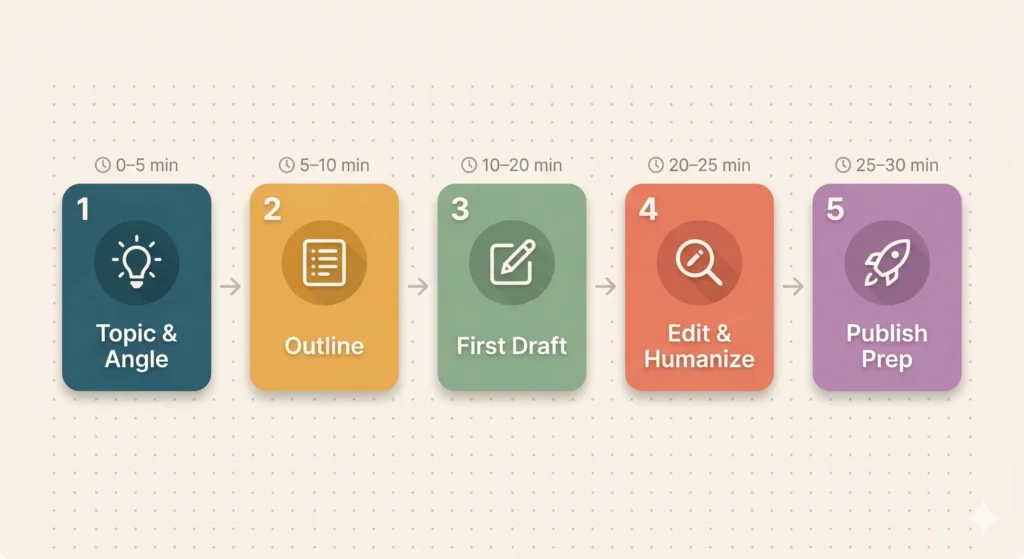
Minutes 20–25 — Edit and humanize
Read through the full draft and do three things. Add at least one specific, personal detail per major section. Cut every sentence that could have been written by anyone about anything. Adjust the tone to match your voice.
This is the step that separates good AI-assisted content from generic AI content. Don’t skip it.
Minutes 25–30 — Title, meta, and publish prep
Ask AI to generate title options: “Generate five title options. Make them specific, benefit-driven, and accurate. Avoid clickbait.” Then: “Write a meta description under 160 characters including the primary keyword.”
Pick your title, adjust the meta, add your focus keyword to Rank Math, and you’re ready.
The Prompts That Do the Heavy Lifting
Angle: “What’s the most interesting angle on [topic] for [target reader]? Five options.”
Outline: “Create a detailed outline for a 1,500-word post on [topic + angle] for [target reader].”
Draft: “Write the [section] section. Conversational tone, no filler. Include [specific point].”
Edit: “Make this section sound more natural and less generic. Keep the structure.”
Where AI Helps Most — And Where You Still Need to Show Up
AI is excellent at generating structure, producing first draft prose, suggesting angles, and editing for clarity. AI is not a substitute for your genuine experience, specific real examples, your authentic voice, or the judgment to know when something is wrong.
The best posts produced with this system aren’t AI posts with a human’s name. They’re human posts that AI helped write faster.
How to Make Every Post Sound Like You
Read every draft section out loud before finalizing. Your ear catches unnatural phrasing your eye misses. Keep a list of phrases you actually use in conversation and replace AI phrasing with your own. Add one genuine opinion per post — specific enough to be disagreed with.

Your First 30-Minute Post Starts Now
Pick a topic you know well. Open your AI tool. Set a timer for 30 minutes.
Run through the five steps exactly as described. The first time might take 35 minutes. By the fifth time you’ll finish with time to spare.
Write a blog post using AI the right way — not as a shortcut, but as a smarter process — and your content output will change significantly. Not someday. Starting with the next post you write.
Set the timer. Start now.
What’s Next?
You can now write blog posts faster. But what about the visuals that make readers stop scrolling?
In the next post, we compare the best AI image generators — Midjourney, DALL-E, and Ideogram — so you know exactly which one to use for your blog.
👉 Read next: Best AI Image Generators Compared: Midjourney, DALL-E, Ideogram