A year ago, picking an AI image generator was simple. Midjourney was the obvious choice if you cared about quality, and everything else was a distant second.
That gap has narrowed significantly. DALL-E 3 improved in ways that matter for practical use. Ideogram emerged as a genuine contender, especially for text-heavy visuals. And Midjourney kept raising its own bar with each model update.
The best AI image generators in 2026 are genuinely different tools with genuinely different strengths — and the right choice depends on what you’re actually creating. Here’s an honest breakdown of all three, tested on the tasks that matter most for bloggers, content creators, and solopreneurs.
Why the Right Image Generator Actually Matters
Blog visuals aren’t decoration. They’re the first thing a reader sees before deciding whether the post is worth their time. A strong hero image increases click-through rate from search results, social shares, and email opens. In-body images break up long sections and keep readers scrolling. The difference between a generic stock photo and a well-crafted AI image that directly illustrates your point is measurable in reader engagement.
For bloggers generating multiple posts per week, choosing the right AI image tool directly affects how much time you spend on visuals and how good they look when they’re done.
How We Tested Each One
Each generator was tested across four categories: photorealistic scenes, stylized illustrations, text-in-image accuracy, and speed of iteration from prompt to usable result.
We used the standard paid tiers and tested with both simple and complex prompts. The goal wasn’t to find the most technically impressive outputs — it was to find which tool delivers the best results for the kinds of images bloggers and content creators actually need.
Midjourney — The Creative Powerhouse
What it does best
Midjourney produces the most visually striking images of the three — consistently. If aesthetic quality is your primary criterion, it’s still the benchmark everything else gets measured against.
Its strength is in atmosphere and composition. Images generated by Midjourney have a quality of light, texture, and visual cohesion that feels intentional in a way the other tools don’t consistently match.
For hero images, editorial lifestyle photography style, and anything where the visual needs to stop someone mid-scroll, Midjourney is the strongest option available.
The v6 model in particular handles photorealistic human subjects significantly better than earlier versions — a weakness that used to be its most obvious limitation.
Where it falls short
Midjourney has no free tier, operates entirely through Discord (which adds friction for new users), and doesn’t handle text within images reliably. If you need words, logos, or readable labels inside your visuals, Midjourney will frustrate you.
Iteration is also slower than the competition. Because the interface is Discord-based rather than a dedicated web app, the workflow for testing multiple prompt variations is less fluid than DALL-E or Ideogram.
Best for: Hero images, editorial lifestyle photography, high-quality atmospheric visuals.
DALL-E 3 — The Accessible All-Rounder
What it does best
DALL-E 3’s biggest advantage is accessibility — it’s built directly into ChatGPT, which means if you’re already paying for ChatGPT Plus, you have access to it immediately — no separate subscription, no learning a new interface.
For bloggers who need to generate images quickly as part of a broader content workflow, this integration is genuinely valuable. You can go from writing a blog section to generating a supporting image in the same tool without switching tabs.
DALL-E 3 also follows complex prompts more literally than Midjourney. If you need a specific scene — a particular configuration of objects, a specific mood, a precise setting — DALL-E tends to deliver what you asked for rather than an artistic interpretation of it.
Where it falls short
The ceiling on DALL-E 3’s quality is lower than Midjourney’s. Images are consistently competent but rarely stunning. For in-body blog images where functional clarity matters more than visual artistry, this is fine. For hero images competing for attention in crowded search results, it can fall short.
Photorealistic human figures are also noticeably less convincing than Midjourney’s current output — a limitation that’s visible at a glance on detailed portraits or lifestyle scenes.
Best for: Quick in-body blog images, workflow integration with ChatGPT, prompt-accurate scene generation.
Ideogram — The Dark Horse Worth Knowing
What it does best
Ideogram does one thing better than both Midjourney and DALL-E: text inside images.
If you’ve ever tried to get readable words, clean labels, or accurate typography inside an AI-generated image, you know how badly most tools handle it. Ideogram was built with this problem specifically in mind, and the difference is dramatic. Text rendered by Ideogram is consistently legible, well-spaced, and stylistically coherent with the surrounding image.
For bloggers who create infographic-style visuals, comparison graphics, or any image that needs words inside it, Ideogram fills a gap that the other tools leave open.
Beyond text, Ideogram’s poster and graphic design outputs are genuinely impressive — clean, well-composed, and with a visual polish that rivals Midjourney for certain content types.
Where it falls short
Ideogram’s photorealistic output is noticeably weaker than both Midjourney and DALL-E for complex scenes involving people. For lifestyle photography style images — the kind most useful for blog hero images — it’s not the right tool.
It’s also the least known of the three, which means a smaller community, fewer prompt resources, and less third-party documentation to draw on when you’re learning.
Best for: Text-in-image visuals, infographic-style graphics, poster and promotional content.
Head-to-Head: How They Compare
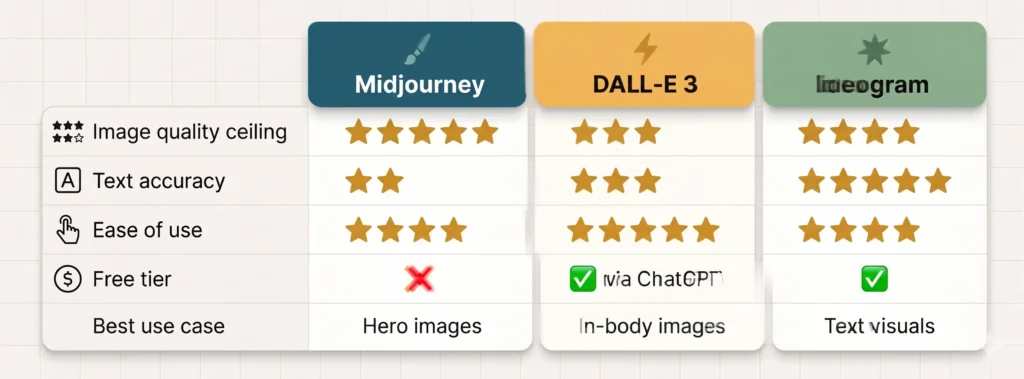
Image quality ceiling: Midjourney leads clearly. Text accuracy: Ideogram wins by a wide margin. Ease of use: DALL-E 3 is the most accessible. Free tier: DALL-E 3 via ChatGPT and Ideogram both offer free access. Midjourney does not.
Which One Should You Actually Use?
For most bloggers, the practical answer is two tools rather than one.
Use Midjourney for hero images where visual impact is the priority. The quality difference over the other two tools is meaningful enough to justify the separate subscription if you’re publishing consistently.
Use DALL-E 3 or Ideogram for in-body images where speed and workflow efficiency matter more than maximum visual quality. If you’re already paying for ChatGPT Plus, DALL-E 3 costs you nothing extra. If your posts regularly need text-in-image visuals, Ideogram is the better choice for that specific need.
The best AI image generators aren’t necessarily the most expensive ones — they’re the ones that match your specific content needs and fit naturally into your workflow.
The Honest Verdict
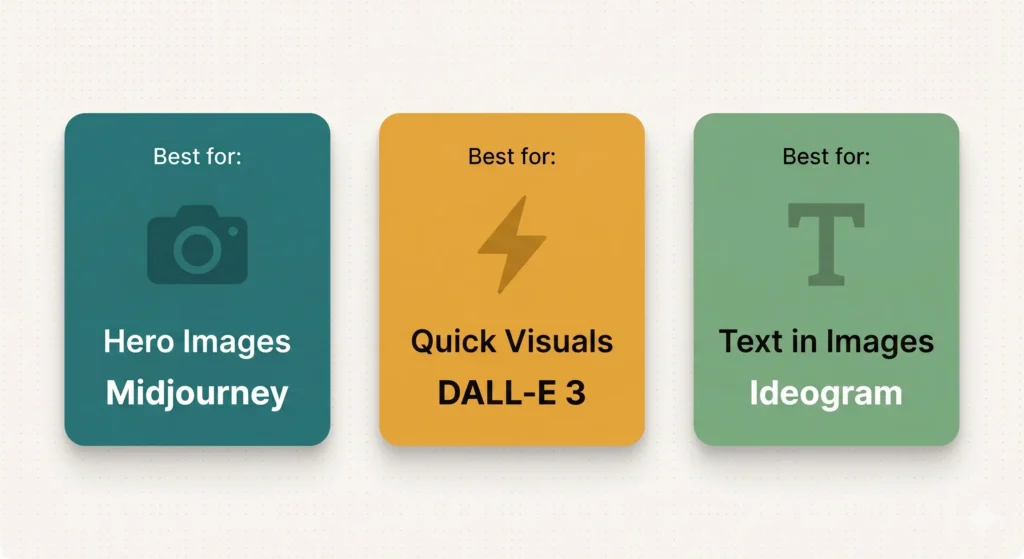
Midjourney is still the best for visual quality. If you care about producing hero images that genuinely stand out, it’s worth the subscription and the Discord learning curve.
DALL-E 3 is the best for accessibility and workflow integration. If you’re already in the ChatGPT ecosystem and need competent images without additional cost or friction, it delivers.
Ideogram is the best for text-in-image content. If your visuals regularly include words, labels, or typography, nothing else comes close.
The best AI image generator for you is the one that solves the specific visual problem you have most often. Start with what your workflow already supports, identify where the output falls short, and add a second tool only when the gap is costing you real time or quality.
What’s Next?
You can now create better visuals faster. But what about video content?
In the next post, we tackle the question everyone’s asking about AI and YouTube: can it actually write your scripts — and should you let it?
👉 Read next: Can AI Write Your YouTube Scripts? An Honest Review