Everyone has an opinion on this one.
Ask ten people which AI assistant they use and you’ll get ten different answers — each delivered with surprising conviction. ChatGPT fans swear nothing else comes close. Gemini users love the Google integration. Claude advocates say it’s the only one that actually thinks before responding.
ChatGPT vs Gemini vs Claude — we put all three through the same real-world tests across the tasks that actually matter for knowledge workers, bloggers, and solopreneurs. No benchmark scores, no lab results. Just honest, practical observations from actual daily use.
Here’s what we found.

Why This Comparison Actually Matters in 2026
A year ago, ChatGPT was the undisputed default. You used it because nothing else came close.
That’s no longer true. Gemini has matured significantly with deep Google ecosystem integration. Claude has built a strong reputation for nuanced, careful reasoning. And ChatGPT itself has expanded well beyond text — images, voice, file analysis, browsing, custom GPTs.
Choosing between ChatGPT vs Gemini vs Claude in 2026 requires a real decision. And that decision has real consequences for how efficiently you work every single day.
How We Tested Each One
Each assistant was given the same five tasks — no special prompting, no fine-tuning. Just the kind of request a regular user would type on a regular day.
We used the paid tier of each where available, since that’s what serious users are running. The five test categories: writing and tone, research and accuracy, coding and technical help, creative thinking, and everyday productivity tasks.
Head-to-Head: 5 Real-World Tests
Test 1 — Writing and Tone
The task: Write a 200-word email declining a meeting request professionally but warmly.
All three handled this competently — but the differences were noticeable.
ChatGPT produced a clean, professional email quickly. Correct and usable, but the tone felt slightly generic — like a well-executed template.
Gemini’s output was similar in quality but slightly more formal. It got the job done without real personality.
Claude’s version was the most natural. The phrasing felt like something a real person would actually write — warmer, less corporate, with subtle nuance the other two missed. For any writing task where tone matters, Claude has a consistent edge.
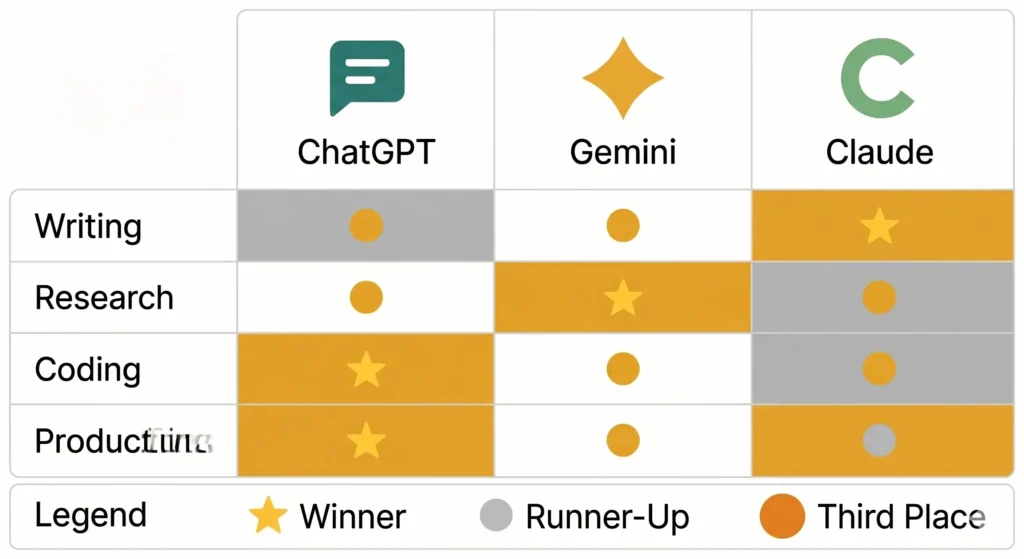
Winner: Claude
Test 2 — Research and Accuracy
The task: Summarize the current state of AI regulation in the EU with key recent developments.
ChatGPT provided a solid summary but flagged its knowledge cutoff and suggested verifying recent developments. Accurate and appropriately cautious.
Gemini pulled in real-time information through Google Search integration, providing more current details with sources linked directly in the response. For research requiring up-to-date information, this is a genuine advantage neither competitor can match.
Claude gave a thorough, well-structured summary with strong analytical depth — but like ChatGPT, was limited by its training data on very recent developments.
Winner: Gemini (when current information matters)
Test 3 — Coding and Technical Help
The task: Debug a Python script with a specific logical error and explain what went wrong.
ChatGPT remains the gold standard here. It identified the error immediately, explained the logic clearly, provided the corrected code, and suggested two alternative approaches unprompted. For anyone working with code regularly, ChatGPT’s technical depth is hard to beat.
Claude performed well — clear explanation, correct fix — but didn’t go as far in offering alternatives or anticipating follow-up questions.
Gemini’s response was accurate but the explanation felt less structured, making it harder to follow for someone newer to coding.
Winner: ChatGPT
Test 4 — Creative Thinking
The task: Generate five unusual blog post angles about remote work that haven’t been done to death.
This is where Claude genuinely surprised. The five ideas it produced were specific, unexpected, and actually interesting — the kind of angles a thoughtful editor might suggest, not the recycled list-format ideas most AI tools reach for by default.
ChatGPT’s suggestions were solid but more predictable. Gemini’s were competent but clearly the most conventional of the three.
For content creation, brainstorming, or strategic thinking, Claude consistently feels more original.
Winner: Claude
Test 5 — Everyday Productivity Tasks
The task: Draft a weekly to-do list structure for a solopreneur managing content, client work, and personal development.
All three handled this well. ChatGPT produced the most structured output with clear categories and logical hierarchy. Claude’s version felt more conversational and easier to actually use. Gemini’s was functional but the least distinctive.
Winner: ChatGPT (narrow margin)
Pricing: What You Actually Pay
All three offer free tiers with meaningful limitations. Here’s what the paid versions cost.
ChatGPT Plus runs at $20 per month — the most feature-rich tier, including image generation, voice mode, file uploads, browsing, and custom GPTs.
Gemini Advanced is included with Google One AI Premium at $20 per month, which also bundles 2TB of Google Drive storage and deep integration across Gmail and Docs. Strong value if you’re already in the Google ecosystem.
Claude Pro also runs at $20 per month, focused on raw reasoning and writing quality rather than feature breadth. Fewer bells and whistles — more focus on the output itself.
The Verdict — Which One Wins?
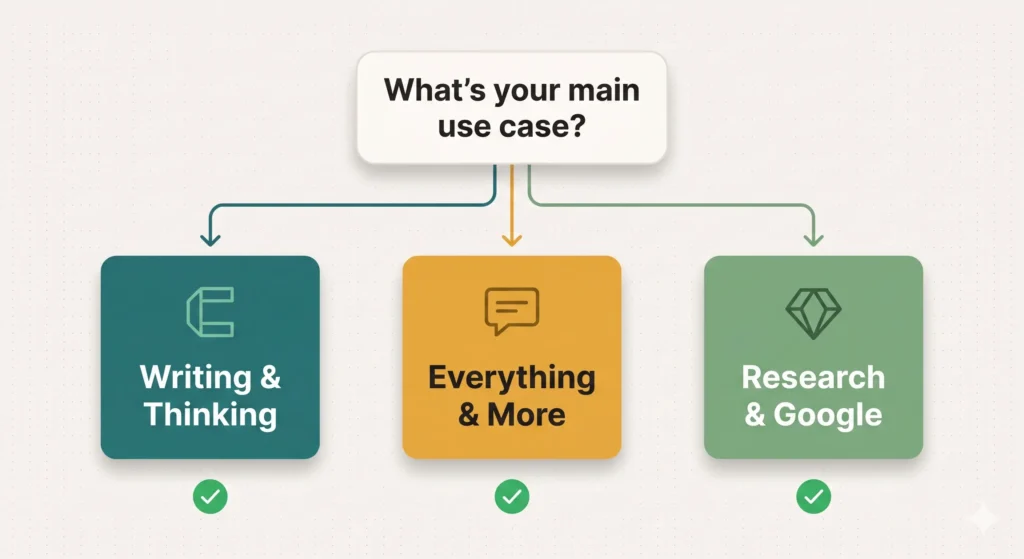
Best overall: ChatGPT
For sheer versatility, ChatGPT remains the default recommendation. It handles the widest range of tasks competently, has the most mature ecosystem, and continues to improve rapidly. If you need one tool that does everything reasonably well, this is it.
Best for research: Gemini
In the ChatGPT vs Gemini vs Claude comparison, Gemini’s real-time search integration is its defining advantage. If your work involves staying current on fast-moving topics, or you’re deeply embedded in Google Workspace, Gemini pulls ahead clearly.
Best for writing: Claude
For anyone whose primary use case is writing, editing, or working through complex ideas, Claude consistently produces output that feels more human and more considered. It won’t do everything ChatGPT does — but what it does, it often does better.
What If You Could Only Pick One?
Start with ChatGPT.
It covers more ground, has the largest community of support and integrations, and the free tier is genuinely useful for testing whether AI assistance fits your workflow.
Once you’re clear on where AI saves you the most time, layer in a second tool. Writing is your main use case? Add Claude. Research is? Add Gemini.
Many serious users end up running two in parallel — ChatGPT for technical and multi-modal tasks, Claude for writing and thinking. The combined $40 per month is easy to justify once you’re saving several hours of work each week.
The Real Answer Nobody Wants to Hear
The best AI assistant is the one you’ll actually use consistently.
All three tools in the ChatGPT vs Gemini vs Claude comparison are capable enough that the gap between them matters far less than how effectively you use whichever one you choose. A person who has learned to prompt one tool well will outperform someone dabbling with all three and mastering none.
Pick one. Learn it deeply. Then decide if a second is worth adding.
The comparison will keep evolving as all three platforms improve. What matters today is building the habit of using AI effectively — because that habit compounds in ways that tool-switching never will.
What’s Next?
Now that you know which AI assistant fits your needs, the next question is how to actually fit it into your daily routine without it feeling like extra work.
In the next post, I share exactly how I use AI to plan my entire week in under 10 minutes — including the prompts I use every Monday morning.
👉 Read next: How I Use AI to Plan My Week in Under 10 Minutes