
Monday mornings used to be my least productive time of the week.
Not because I was lazy. Because I had too much to think about and no system for turning that mental noise into an actual plan. I’d spend the first hour of the week just trying to figure out what the week was supposed to look like — and by the time I had a rough idea, half the morning was gone.
Using AI to plan my week changed that completely. Not in a dramatic, life-altering way. Just quietly, practically — in a way that freed up mental space for actual work.
Here’s the exact system I use every Monday morning, start to finish, in under 10 minutes.

Why Most Weekly Planning Systems Fall Apart
Most planning systems fail for the same reason: they require more energy to maintain than they actually save.
You spend Sunday night setting up a beautiful planner spread. By Wednesday, reality has overtaken the plan and you’ve abandoned it entirely. By Friday, you’re not sure what you accomplished or what got missed.
The problem isn’t discipline. It’s that traditional planning systems are rigid. They don’t adapt to the reality of a week that never goes exactly as expected.
What I needed wasn’t a prettier planner. I needed a system that could take the chaos of everything I had going on and turn it into a workable structure — fast, without friction, every single week. That’s exactly what AI to plan my week does.
The 10-Minute AI Planning System I Use Every Monday
The whole system takes between 8 and 12 minutes. Here’s each step.
Step 1 — Brain dump everything in 2 minutes
Before opening any AI tool, I spend exactly two minutes writing down everything that’s on my mind for the week. Projects, tasks, calls, deadlines, personal commitments, things I’ve been avoiding. Everything goes on the list — no filtering, no organizing.
The goal is to get it out of my head and onto the page. An unfiltered brain dump is more useful than a carefully curated task list, because it captures the mental load accurately rather than the idealized version of what you think you should be doing.
Two minutes. Set a timer. Write everything.
Step 2 — Feed it to AI and ask for structure
I take that messy brain dump and paste it directly into my AI assistant of choice. Then I use this prompt:
“Here’s everything on my plate this week. Can you organize this into categories — work projects, admin tasks, personal commitments, and anything that can wait — and flag anything that looks urgent or time-sensitive?”
In about 30 seconds, the chaos becomes structured. The AI groups similar items, surfaces anything with a deadline, and often spots things I hadn’t consciously registered as urgent.
Step 3 — Prioritize with a single prompt
Once the week is organized, I ask one more question:
“Based on what I’ve shared, what are the three most important things I should focus on this week? And what should I consider delaying or delegating?”
The AI doesn’t know my business as well as I do — but it asks no questions and has no emotional attachment to any of the items on the list. That objectivity is genuinely useful.
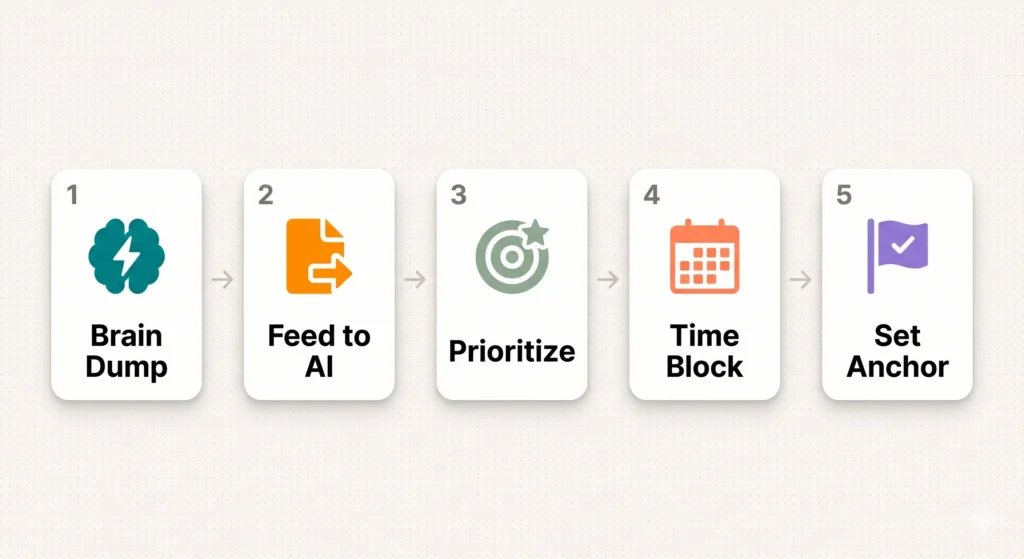
Step 4 — Block your time in 3 minutes
With my top three priorities confirmed, I open my calendar and block time for each one — actual calendar blocks, not just a to-do list. This is the step most people skip, and it’s the reason most weekly plans don’t survive contact with reality.
A task on a list is a wish. A task on your calendar is a commitment.
I ask the AI one more thing here: “Given these three priorities, how would you suggest distributing them across the week? I have deep work time in the mornings and prefer admin in the afternoons.”
Step 5 — Set your one non-negotiable for the week
The final step is identifying one thing — just one — that absolutely must happen this week regardless of what else comes up.
I ask the AI: “Based on everything I’ve shared, what should my non-negotiable be this week?”
Sometimes it confirms what I already knew. Sometimes it surfaces something I’d been unconsciously avoiding. Either way, having it named and committed to is what makes the difference between a reactive week and an intentional one.
The Exact Prompts I Use Every Monday
For easy reference, here are the four prompts in sequence:
Prompt 1 — Organize
“Here’s everything on my plate this week: [paste brain dump]. Can you organize this into categories and flag anything urgent or time-sensitive?”
Prompt 2 — Prioritize
“Based on what I’ve shared, what are the three most important things I should focus on this week? What should I consider delaying or delegating?”
Prompt 3 — Time block
“Given these three priorities, how would you suggest distributing them across the week? I have deep work time in the mornings and prefer admin in the afternoons.”
Prompt 4 — Anchor
“Based on everything I’ve shared, what should my one non-negotiable be this week?”
What This System Does That Paper Planners Can’t
A paper planner gives you structure but no intelligence. It can’t look at your list and tell you what matters most. It can’t spot that two of your “urgent” tasks are actually the same project approached from different angles.
Using AI to plan my week adds a layer of analysis that a blank page simply can’t provide. It’s not replacing your judgment — it’s giving your judgment better inputs to work with.
The Mistakes I Made Before This System
I spent months trying to find the perfect planning app. I built elaborate Notion dashboards that I abandoned within two weeks. I tried time-blocking every hour of every day and burned out by Tuesday.
The mistake in all of these was complexity. The more elaborate the system, the more energy it required to maintain — and the less energy was left for actually doing the work.
The best planning system is the one you’ll actually use every week, consistently, without it feeling like a chore. For me, that turned out to be a messy brain dump, four AI prompts, and a calendar. Ten minutes, every Monday.

What a Real Monday Looks Like
7:30am — I make coffee and open a blank document. I set a two-minute timer and write everything down.
7:32am — I paste it into ChatGPT with Prompt 1. Thirty seconds later I have four organized categories and a flag on the most time-sensitive items.
7:33am — Prompt 2. The AI suggests my top three priorities and flags what can wait.
7:35am — Prompt 3. It suggests how to distribute those priorities across the week based on my schedule.
7:37am — I block those times in my calendar. Three minutes.
7:40am — Prompt 4. My non-negotiable for the week is named. I write it at the top of my notebook.
Total time: 10 minutes. Week planned. Coffee still warm.
Try It This Monday
You don’t need a new app. You don’t need a productivity course. You don’t need to redesign your entire workflow.
You need ten minutes, a brain dump, and four prompts.
Try the system this Monday exactly as described. Run all five steps without skipping any. See how different your week feels when it starts with clarity instead of chaos.
AI to plan my week isn’t magic. It’s just a faster, smarter way to do something you were already trying to do — and doing it consistently is what makes the difference.
Start this Monday.
What’s Next?
You’ve got your weekly plan sorted. But what about the tools that make every day inside that plan more efficient?
In the next post, we break down exactly which AI tools are worth paying for and which ones you can get for free — so you know exactly where to spend and where to save.
👉 Read next: Free vs. Paid AI Tools: What’s Worth Your Money?