The short answer is yes. The more useful answer is: it depends entirely on how you use it.
There’s a version of AI-assisted YouTube scripting that produces generic, lifeless videos that feel like they were written by a committee. And there’s a version that cuts your scripting time in half while producing content that sounds exactly like you — maybe even better than your unassisted first drafts.
The difference between those two outcomes isn’t the AI tool. It’s the workflow.
This review covers what happens when you actually let AI write YouTube scripts — the real results, the genuine limitations, and the hybrid approach that delivers the best of both.

The Question Everyone’s Actually Asking
When people ask “can AI write YouTube scripts,” what they’re really asking is one of three things.
- Will it sound like me?
- Will my audience be able to tell?
- And will it actually be good enough to publish without embarrassing myself?
All three are fair questions. All three have honest answers — which is what this review is here to provide.
What We Tested — And How
We tested 4 AI tools on YouTube script generation: ChatGPT, Claude, Gemini, and a dedicated script-writing tool. Each was given the same brief: a topic, a target audience, an approximate video length (8 minutes), and a requested tone (conversational, direct, no fluff).
We evaluated the outputs on five criteria: structure and flow, hook quality, voice naturalness, information accuracy, and how much editing was required before the script felt ready to record.
Where AI Genuinely Helps With YouTube Scripts
Generating structure and outlines
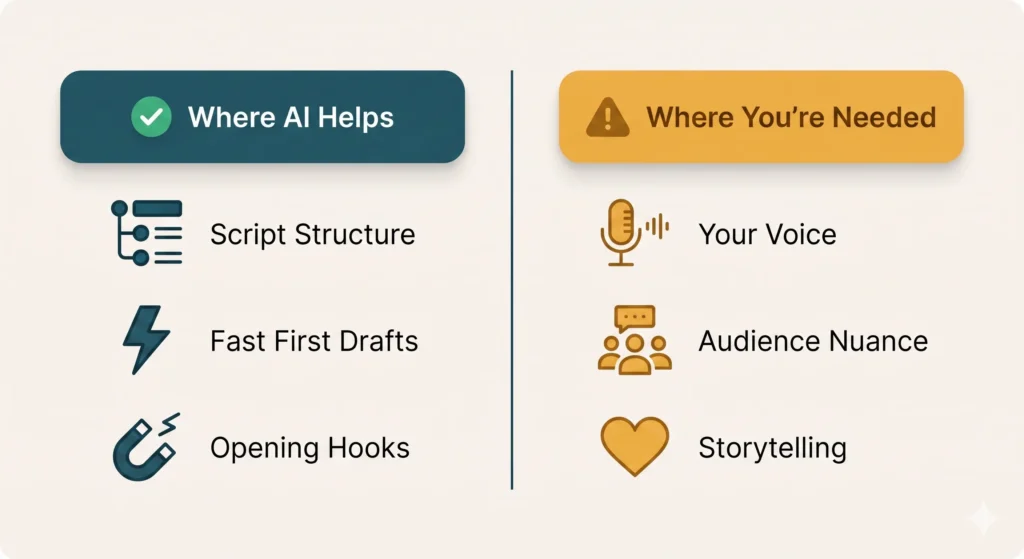
This is where AI delivers the most consistent, reliable value. Give it a topic and a target length and it will produce a logical, well-paced structure in under a minute — intro hook, three to five main points, transitions, and a call to action.
For creators who spend significant time figuring out what order to cover things in, this alone is worth the workflow adjustment. Structure is also the easiest AI output to evaluate and modify — you can see immediately whether the flow makes sense and move sections around in seconds.
Writing first drafts fast
Once the structure is confirmed, AI can draft each section quickly and competently. The prose is clean, the sentences are clear, and the information is generally accurate for well-documented topics. A complete first draft of an 8-minute script — roughly 1,200 to 1,400 words — takes about five minutes to generate.
The draft won’t be perfect. It will need editing. But having something to react to and improve is fundamentally faster than starting from a blank page. The psychology of editing is different from the psychology of creating — and most people find editing significantly easier.
Hooks and opening lines
Openings are disproportionately important on YouTube. The first 30 seconds determine whether a viewer stays or leaves. They’re also, for many creators, the hardest part to write.
AI is surprisingly good at generating hook options. Ask it for five different opening approaches for the same video and you’ll typically get a useful range — from curiosity-gap hooks to bold statements to personal story openers. Even if none of them are perfect, they serve as strong starting points that take less time to improve than to create from scratch.
Where AI Falls Short
Your voice and personality
This is the most significant limitation — and the one that matters most for YouTube specifically.
YouTube audiences subscribe to people, not topics. Your specific way of explaining things, your humor, your verbal habits, the way you transition between points — these are what build a loyal audience. AI produces competent, neutral prose. It doesn’t produce your prose.
The gap shows up most clearly when you record an unedited AI script and play it back. Technically correct. Often informative. Rarely sounds like you. The sentences are structured in ways you wouldn’t naturally structure them. The transitions are logical but not how your brain makes connections.
This isn’t a reason to avoid using AI — it’s a reason to treat its output as a first draft that needs your voice added back in, not a finished product.
Audience-specific nuance
AI tools don’t know your audience the way you do. They produce content calibrated for a general audience on a given topic. Your audience has specific knowledge levels, specific questions they’re tired of hearing answered the same way, specific inside references and community context that make them feel seen.
The more niche your channel, the more this limitation shows. A script written for “people interested in productivity” reads very differently from a script written for the specific audience you’ve spent two years building.
Storytelling and emotional arc
Informational content — tutorials, explainers, comparisons — translates better to AI scripting than story-driven content. AI can structure information well. It struggles with the kind of personal narrative that makes a video feel genuinely compelling rather than just informative.
If your channel’s strength is storytelling — personal experiences, emotional journeys, narrative-driven content — AI can help with the informational scaffolding but the story itself still needs to come from you.
The Workflow That Actually Works
The most effective approach isn’t “AI writes the script” or “I write the script.” It’s a specific collaboration that plays to each party’s strengths.
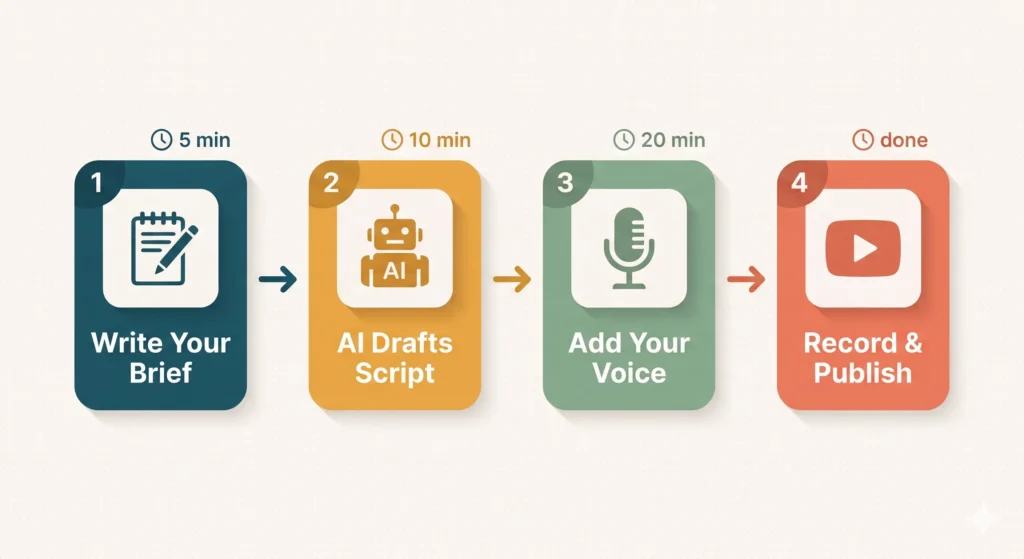
Start with a detailed brief. Before opening any AI tool, write down your specific angle, two or three personal examples or stories you want to include, your audience’s knowledge level, and one or two things your audience is tired of hearing said the wrong way. This brief takes five minutes and dramatically improves AI output quality.
Use AI for structure and first draft. Generate the outline, review and adjust it, then draft section by section. For each section, include in your prompt any personal examples you want incorporated.
Rewrite in your voice. Go through the full draft and replace any sentence that doesn’t sound like you. This isn’t light editing — for some creators it’s rewriting 30 to 50 percent of the draft. That’s still faster than writing from scratch.
Record a test section. Before recording the whole video, record the opening two minutes of the script. Play it back. If it sounds like you, proceed. If it sounds like AI read by you, go back and rewrite more aggressively.
Should You Disclose That You Used AI?
Transparent disclosure builds trust. There’s no universal requirement to disclose AI assistance in video scripting — just as there’s no requirement to disclose that you used a word processor or a research assistant.
That said, if AI-generated content is a significant component of your videos and your audience values authenticity highly, a brief mention in your process — in a community post, a behind-the-scenes video, or a pinned comment — tends to generate positive responses rather than negative ones. Audiences generally appreciate honesty about process, especially when the content itself is high quality.
What matters more than disclosure is quality. An AI-assisted script that’s been thoroughly edited to sound like you and provides genuine value is more ethical than a purely human-written script full of filler and recycled advice.
The Honest Bottom Line
Can AI write YouTube scripts that are good enough to publish? Yes — with the right workflow and enough editing to put your voice back in.
Should you use AI to write your entire script with minimal editing and record it straight? No — the result will be technically adequate and personally hollow, and your audience will feel the difference even if they can’t name it.
The most honest assessment: AI is an excellent YouTube scripting assistant and a poor YouTube scripting replacement. The distinction matters, and the creators who get the most value from it are the ones who understood that from the start.
Use it to do faster what you were already doing. Don’t use it to skip the part where you actually show up.
What’s Next?
You can now write scripts faster. But how do you turn those scripts into actual automations that run without you?
In the next post, we break down how to build a no-code AI automation in a single afternoon — using Zapier and ChatGPT together.
👉 Read next: Build a No-Code AI Automation in One Afternoon (Zapier + ChatGPT)