
Your back knows the difference.
One flight, one overpacked bag, one laptop that weighs more than your carry-on allowance allows — and you spend the next week regretting your gear choices. If you work remotely and move around, the laptop you choose matters more than almost any other piece of equipment you own.
This guide covers the best lightweight laptop options for remote workers and travelers heading into 2026. No fluff, no spec sheets for the sake of it. Just honest picks based on what actually matters when you’re working from cafés, coworking spaces, airports, and Airbnbs.

What “Lightweight” Actually Means for Remote Workers
Weight vs. Portability — They’re Not the Same Thing
A laptop can weigh 2.5 pounds and still be awkward to carry. And a 13-inch machine can fit perfectly in your bag but run out of battery before your morning meetings are done.
True portability means weight plus battery life plus size. When all three work together, you forget the laptop is even in your bag. When one fails, the whole experience breaks down.
For most remote workers and travelers, the sweet spot in 2026 sits between 1.1 kg and 1.4 kg (2.4 to 3.1 lbs). Under that, you start making real trade-offs on screen size or build quality. Over it, your shoulders start filing complaints.
The Four Things That Actually Matter
Before jumping to model names, here’s what your decision should actually hinge on:
Battery life (real-world, not claimed). Manufacturers quote numbers in ideal conditions. Real-world usage — video calls, browser tabs, cloud apps — typically lands 30–40% lower. Target machines rated at 18+ hours so you reliably get 12+ in practice.
Weight including the charger. A 1.2 kg laptop with a 0.5 kg power brick is a 1.7 kg carry. Modern USB-C charging is a game-changer here — most top picks below use it.
Build quality for travel. MIL-STD-810H certification means the chassis has been tested against drops, dust, humidity, and temperature changes. Not a dealbreaker, but a good sign for frequent travelers.
Screen size for your work type. Writers and coders do fine on 13–14 inches. Anyone working with spreadsheets, design files, or multiple windows will feel cramped. A 16-inch machine that still weighs under 1.3 kg is the best of both worlds — and that’s now possible.
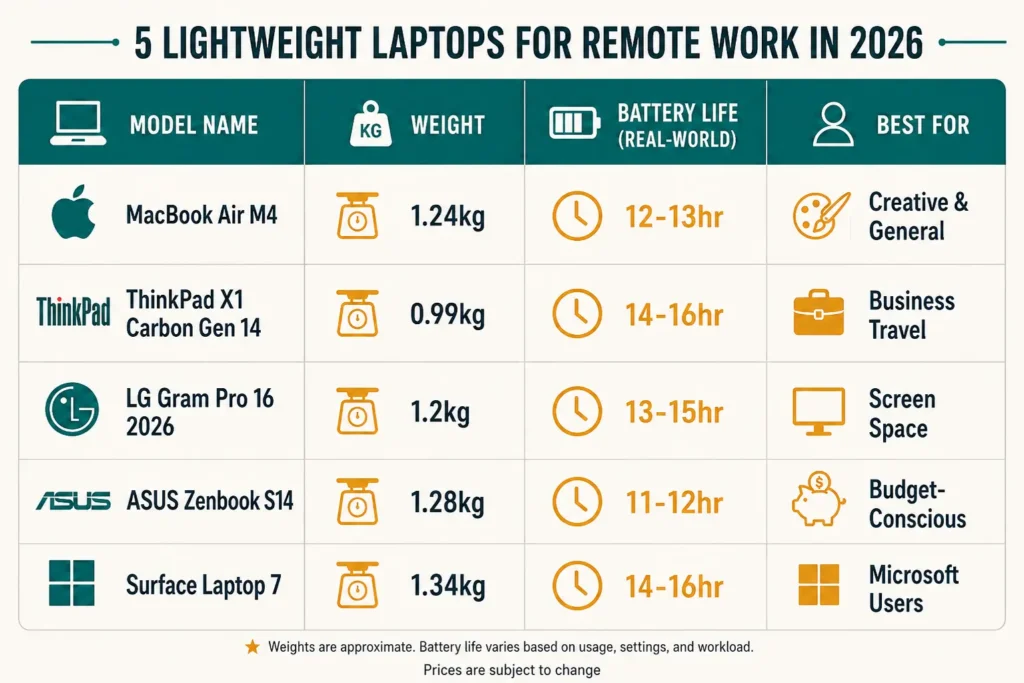
Top Lightweight Laptops for Remote Workers in 2026
Apple MacBook Air M4 13″ — The All-Around Champion
Weight: 1.24 kg (2.7 lbs)
Battery (real-world): 12–13 hours
Best for: General remote workers, creatives, video callers
The MacBook Air M4 remains the go-to recommendation for most people. The M4 chip handles video calls, browser-heavy workflows, and creative apps without ever turning on a fan — because there is no fan. It runs completely silently.
Real-world battery consistently lands between 12 and 13 hours under normal workloads. The Liquid Retina display is sharp and readable even in brighter environments. USB-C charging means you can top up from any power source, and the 30W charger weighs next to nothing.
The main trade-off: if you’re on Windows, or if your workflow depends on Windows-only software, this isn’t for you. And at 13 inches, heavy spreadsheet work can feel tight.
Lenovo ThinkPad X1 Carbon Gen 14 — The Lightest Workhorse
Weight: 0.99 kg (2.17 lbs) — under 1 kg
Battery (real-world): 14–16 hours
Best for: Business travelers, frequent flyers, security-conscious professionals
The ThinkPad X1 Carbon Gen 14 crossed a milestone that still feels remarkable — it weighs under one kilogram. The carbon fiber reinforced chassis keeps it rigid and durable while achieving a weight that genuinely disappears in your bag.
Battery life here is class-leading for Windows machines. The keyboard remains one of the best in the industry — deep travel, satisfying feedback, exactly what you want for long writing sessions. The 14-inch 2.8K OLED display is vivid and sharp, with an anti-reflective coating that helps in cafés.
MIL-STD-810H certification means it’s been tested against real travel conditions. If you fly frequently, this machine is built for you.
LG Gram Pro 16 (2026) — Big Screen, Feather Weight
Weight: 1.2 kg (2.65 lbs)
Battery (real-world): 13–15 hours
Best for: Spreadsheet-heavy workers, designers, anyone who wants a larger screen without the weight penalty
The LG Gram Pro 16 pulls off something that felt impossible a few years ago: a genuine 16-inch OLED display in a chassis weighing 1.2 kg. The 2880 x 1800 screen with 120Hz refresh rate is excellent for both productivity and the occasional Netflix session after work hours.
If you regularly work with multiple windows open, large documents, or design tools, the extra screen real estate changes how you work. The nano-magnesium alloy chassis keeps weight down while maintaining structural integrity.
The 2026 model added Wi-Fi 7 and Bluetooth 6.0 — meaningful for coworking spaces and areas with dense wireless environments. Battery life in real use lands around 13–15 hours, which is impressive for a display this size.
ASUS Zenbook S14 — Best Value Ultrabook
Weight: 1.28 kg (2.82 lbs)
Battery (real-world): 11–12 hours
Best for: Budget-conscious travelers who don’t want to compromise on display quality
The Zenbook S14 is the lightweight laptop that makes you do a double-take at the price-to-spec ratio. A 14-inch 2.8K OLED touchscreen, Intel Core Ultra processor, and a premium aluminum chassis — at a noticeably lower price point than the MacBook Air or ThinkPad.
Real-world battery is the weakest point here, landing at 11–12 hours under mixed use. Heavy tasks will drain it faster. Bring the charger for full-day conference sessions.
But for remote workers who spend most of their time writing, researching, video calling, and managing projects through browser-based tools, the Zenbook S14 delivers everything you need without the premium price tag.
Microsoft Surface Laptop 7 — Best for Microsoft Users
Weight: 1.34 kg (2.96 lbs)
Battery (real-world): 14–16 hours
Best for: Microsoft 365 power users, corporate remote workers, Teams-heavy workflows
If your workday runs on Microsoft Teams, Excel, and SharePoint, the Surface Laptop 7 was designed with you in mind. The hardware-software integration is tight — similar to how Apple’s ecosystem flows on a MacBook.
The battery life is exceptional, consistently hitting 14–16 hours in real use. The webcam and microphone array are among the best in the laptop category, which matters more than most people realize until they’ve sat through a year of video calls with bad audio.
At just under 1.34 kg, it’s a bit heavier than the other picks here, but still well within the “daily carry” zone. The tradeoff is worth it for the Teams and Microsoft 365 experience.

How to Choose: Match the Laptop to Your Nomad Style
The Café Worker vs. The Flight-Hopper
If you mostly work from cafés, coworking spaces, and hotels — but don’t fly every week — battery life and screen quality matter most. The MacBook Air M4 and LG Gram Pro 16 are strong choices here.
If you’re in airports every few days, catching trains, and constantly moving through time zones, weight becomes the priority. The ThinkPad X1 Carbon Gen 14 under one kilogram is in a class of its own. Every gram matters when you’re doing it every week.
If you’re budget-conscious and your workflow is primarily browser and cloud-based, the Zenbook S14 covers all the bases at a lower price.
Mac vs. Windows — The Real Answer
This question comes up in every laptop conversation. Here’s the honest answer: it depends on your existing ecosystem and your software needs.
Mac wins on battery efficiency, silent operation, and if you’re already invested in Apple devices. The MacBook Air M4 is the best single machine for most remote workers who don’t have a Windows requirement.
Windows wins on flexibility, software compatibility, and price range. The ThinkPad X1 Carbon and Zenbook S14 are both excellent Windows ultrabooks that hold their own against the MacBook in every practical category.
Don’t switch ecosystems for the sake of it. Pick the platform that matches where your tools already live.
What’s Next?
You’ve got the laptop sorted. Now you need connectivity that works in every country, on every carrier, without paying roaming fees. eSIM technology has changed how remote workers stay online internationally — and some cards are significantly better than others for frequent travelers.
👉 Read next: Best eSIM Cards for International Remote Workers (Reviewed)