Everybody’s talking about AI. But here’s the question worth asking: which tools are actually saving people time on a Tuesday afternoon?
Not in a demo. Not in a carefully produced YouTube video. In real life — during a packed workday, when you’re tired, when you just need something done.
That’s the filter I used to put this list together. These are the AI tools that actually save you time — tested in real daily workflows, not just demos. No experimental tools, no steep learning curves, no fluff.
If you’ve been wondering which AI tools are genuinely worth adding to your routine in 2026, start here.

Why Most “Best AI Tools” Lists Miss the Point
Most AI tool roundups are written by people who tested each tool for forty-five minutes and then ranked them.
That’s not how tools actually work. A tool that impresses in a demo can be frustrating in daily use. A tool that looks boring in a review can quietly become something you use twenty times a day.
The AI tools that genuinely save time share three qualities. They’re fast enough that using them takes less time than not using them. They’re reliable enough that you stop second-guessing the output. And they’re simple enough that they don’t require a mental gear-shift every time you open them.
That’s the bar. Here’s what clears it.
How I Picked These 5
Simple criteria. Each tool on this list had to pass three questions.
Does it save at least 30 minutes per week for a typical knowledge worker? Can someone start getting value from it on day one without a tutorial? And is it useful across different types of work — not just one very specific task?
Every tool below answers yes to all three.
The 5 AI Tools Worth Your Time
1. ChatGPT — Your Always-On Thinking Partner
If you only add one AI tool for productivity to your daily routine, make it this one.
ChatGPT’s value isn’t in doing your work for you — it’s in eliminating the friction that slows your thinking down. First draft of an email you’re dreading? Done in 90 seconds. Trying to structure your thoughts before a difficult conversation? Talk it through with ChatGPT first. Need to summarize a long document fast? Paste and ask.
The use cases are almost unlimited, which is both its strength and the reason people underuse it. Most people treat it like a Google search replacement. The people getting the most out of it treat it like a capable colleague who’s always available, never impatient, and genuinely useful to think out loud with.
The free tier handles most daily tasks well. The paid version adds faster responses, better reasoning, and the ability to work with images and files — worth it if you’re using it heavily.
Time saved per week: 3–5 hours for most knowledge workers.
2. Notion AI — The Smartest Upgrade to Your Workspace
If you already use Notion for notes, projects, or documentation, adding Notion AI is one of the highest-value upgrades available to you right now.
It lives inside your existing workspace, which means no context-switching. You can ask it to summarize a meeting note, draft a project brief from a set of bullet points, translate a document, or explain a complex idea in simpler terms — all without leaving the page you’re already working on.
The feature that saves the most time in practice: autofill. You can create a database of anything — book notes, project ideas, client information — and have Notion AI generate summaries, action items, or analysis for each entry automatically.
If you’re not already using Notion, the learning curve is real. But if you are, this is an easy yes.
Time saved per week: 2–4 hours for regular Notion users.

3. Perplexity AI — Research Without the Rabbit Hole
Anyone who regularly does research online knows the problem. You search for one thing, end up on six different tabs, spend twenty minutes reading tangential information, and come away with half an answer.
Perplexity AI solves this. It’s a search engine built on top of large language models that gives you a direct, sourced answer instead of a list of links to sift through. Ask it a question, get a clear answer with citations you can verify. No algorithm-driven clickbait, no SEO-optimized fluff to wade through.
It’s particularly useful for: quick factual research, getting up to speed on a topic you don’t know well, comparing options before a decision, and checking whether something you think you know is actually accurate.
The free version is excellent. For people who research heavily, the paid tier adds more detailed answers and access to more current information.
Time saved per week: 1–3 hours for anyone who regularly researches topics online.
4. Otter.ai — Never Take Notes in a Meeting Again
If you spend time in meetings — video calls, in-person discussions, interviews, brainstorming sessions — Otter.ai eliminates one of the most tedious parts of professional life: transcription and note-taking.
It records, transcribes, and summarizes conversations in real time. By the end of a one-hour meeting, you have a searchable transcript and a concise summary with key points and action items — automatically generated, no manual effort required.
The practical impact is bigger than it sounds. When you’re not taking notes, you can actually pay attention. The quality of your participation in meetings improves. And the time spent afterward writing up notes, chasing action items, and trying to remember what was decided disappears almost entirely.
Works with Zoom, Google Meet, Microsoft Teams, and in-person recordings via mobile app.
Time saved per week: 2–3 hours for people in regular meetings.
5. Canva AI — Professional Visuals in Minutes
Not everyone needs to create visuals regularly. But for bloggers, content creators, solopreneurs, and anyone who occasionally needs a presentation, social graphic, or document that looks professional — Canva’s AI features have eliminated the need for design skills entirely.
The Magic Design feature generates complete, polished layouts from a text prompt or uploaded content. The AI image generator creates custom visuals without stock photo limitations. The Magic Write feature drafts copy directly inside your designs.
What used to take an hour of template-hunting and manual adjustment now takes five to ten minutes. And the output looks genuinely good — not “good for a non-designer,” just good.
The free tier covers most use cases. The Pro tier unlocks the full AI feature set and is worth it for anyone creating visuals more than a few times per week.
Time saved per week: 1–2 hours for regular visual creators.
How to Actually Build These Into Your Day
Knowing about a tool and actually using it consistently are two different things. Here’s the practical side.
The mistake most people make is trying to use every tool for every task from day one. That approach leads to decision fatigue — spending more mental energy choosing which AI tool to use than actually getting work done.
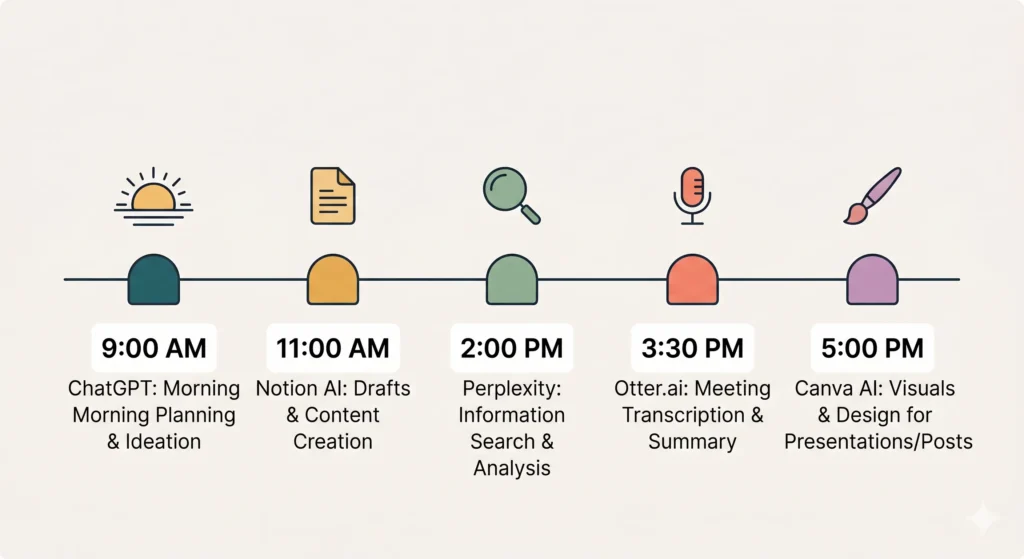
A better approach: assign each tool a specific job. ChatGPT handles writing, thinking, and communication tasks. Perplexity handles research. Notion AI handles workspace and project-related tasks. Otter handles meetings. Canva handles visuals.
When a task comes up, you already know which tool to reach for. No deliberation needed.
The One Mistake People Make With AI Tools
Expecting perfection on the first output.
AI tools are not vending machines. You don’t put in a request and get back a finished product. They’re more like a very fast first draft — something to react to, improve, and shape into what you actually need.
The people who get the most value from AI tools for productivity are the ones who learned to iterate quickly. Ask, evaluate, refine, use. That loop takes thirty seconds once you’re comfortable with it. And the end result is consistently better — and faster — than starting from scratch.
Start With One, Not Five
Here’s the most practical advice on this entire list.
Don’t try to adopt all five tools at once. Pick the one that maps most directly to your biggest daily friction point and use it exclusively for two weeks. Let it become a habit before adding the next one.
If writing and communication eat your time — start with ChatGPT. If meetings are your biggest drain — start with Otter.ai. If research slows you down — start with Perplexity. If your workspace is chaotic — start with Notion AI.
Two weeks of consistent use with one tool will save you more time than two days of dabbling with five.
The goal isn’t to use more AI tools for productivity. The goal is to get your best work done in less time, with less friction, and more energy left over for the things that actually matter.
Start there.
What’s Next?
You’ve got your daily AI toolkit sorted. But which AI assistant should be at the center of it all — ChatGPT, Gemini, or Claude?
In the next post, we put all three head to head with real tasks and give you an honest answer.
👉 Read next: ChatGPT vs. Gemini vs. Claude: Which AI Assistant Wins in 2026?