
You decided to go location-independent. Now you’re drowning in advice.
Every list tells you something different. One person swears by a standing desk adapter. Another insists you need three portable monitors. Meanwhile, you’re just trying to figure out what you actually need to work from a café in Lisbon or a co-working space in Chiang Mai without things falling apart.
Here’s the honest version of a digital nomad starter kit — built around what you’ll actually use, not what sounds impressive in a YouTube thumbnail.
This isn’t about owning the most gear. It’s about owning the right gear, setting up the right accounts, and not discovering critical gaps when you’re already 10,000 miles from home.
Why Most “Starter Kit” Lists Get This Wrong
Most lists are just product dumps. They recommend every gadget imaginable, then leave you guessing which items are truly essential and which are nice-to-haves.
The real question isn’t “what do digital nomads own?” It’s “what do you need before your first week away goes sideways?”
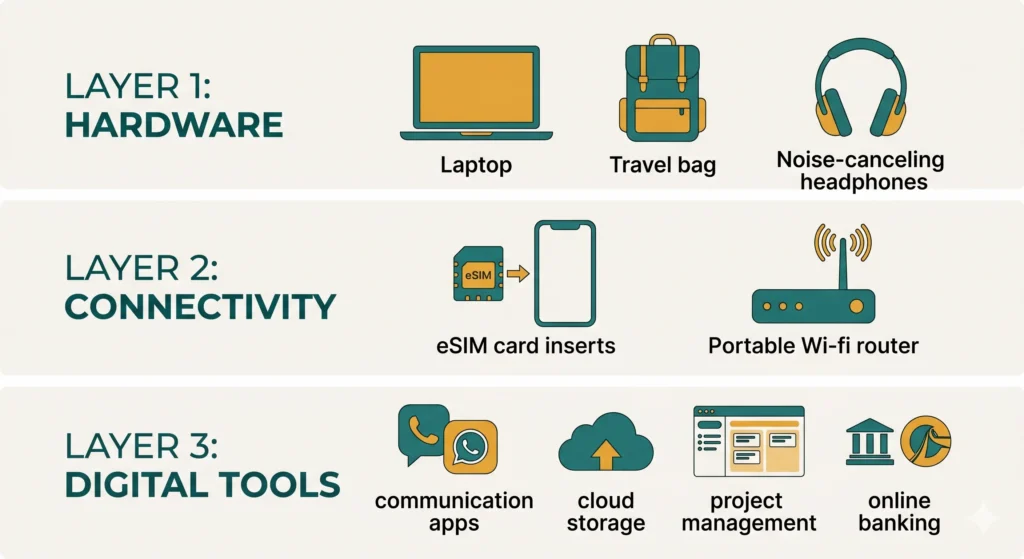
This guide is structured around that question. Three layers: hardware, connectivity, and digital tools. Each layer builds on the last. Get all three right, and your setup will hold up across time zones, border crossings, and unreliable café Wi-Fi.
The Essential Tech Gear
Laptop: Your Most Important Investment
Your laptop is the single piece of gear that everything else depends on. Get this wrong and the rest of the list doesn’t matter.
For remote work in 2026, the baseline is simple: long battery life, a weight under 1.5 kg, and enough processing power to handle video calls, cloud apps, and light content creation simultaneously.
The machines that consistently work well for nomads are ultrabooks — thin, fast, and built for portability. Models like the Apple MacBook Air M-series, the LG Gram series, and the Lenovo ThinkPad X1 Carbon regularly appear at the top of nomad community recommendations for good reason. They’re reliable, they don’t run hot on your lap, and the batteries genuinely last a full workday.
One rule: don’t buy the cheapest option available. Your laptop is your office. It’s not the place to cut corners.
The Right Bag Makes or Breaks Your Day
This sounds minor. It isn’t.
A bag that doesn’t fit under an airplane seat costs you an extra $60 every flight. A bag without a dedicated laptop sleeve means your machine is bouncing around with your water bottle. A bag that looks like a hiker’s backpack marks you as a tourist in every city.
For most nomads, a 20–30 liter daypack works better than a larger travel backpack for daily use. Look for: a padded laptop compartment, water-resistant exterior, and a low enough profile to pass as a personal item on most airlines.
Brands like Peak Design, Aer, and Osprey consistently get recommended in nomad communities. The bag you’ll actually use every day is worth spending real money on.
Headphones, Cables, and the Stuff You’ll Forget
Don’t underestimate the small items that ruin a workday.
Noise-cancelling headphones are non-negotiable if you’re going to work from cafés, trains, or shared spaces. Not just for focus — for video calls where background noise otherwise makes you impossible to understand.
A universal power adapter is essential from day one. Buy one before you leave, not from an overpriced airport shop after you land.
A short USB-C hub matters more than people expect. Many lightweight laptops ship with just two USB-C ports. When you’re plugging in a monitor, a mouse, and charging simultaneously, a compact hub solves a daily frustration.
A cable organizer pouch keeps your bag from becoming a tangled mess. Small item, large quality-of-life improvement.
Connectivity That Won’t Let You Down
eSIM: Your First Line of Defense
This is the piece of the digital nomad starter kit that most beginners overlook — and then regret immediately.
An eSIM is a digital SIM card you download directly to your phone before you travel. No plastic card, no hunting for a local SIM shop when you land exhausted at midnight, no explaining your phone model to someone behind a counter who doesn’t speak your language.
Services like Airalo, Holafly, and Nomad offer regional and country-specific plans that you purchase in advance. The coverage and pricing vary, but the model is the same: buy a data plan online, install it on your phone, activate it when you land.
For most countries in Southeast Asia, Europe, and Latin America, an eSIM plan will handle your basic data needs. Use it as your primary connection when café Wi-Fi isn’t trustworthy.
Backup Internet Options
eSIM handles most situations. But “most” isn’t enough when you have a client call in 20 minutes and the café just rebooted its router.
Two backup approaches work well:
Mobile hotspot from your phone — if your eSIM plan supports tethering (most do), this turns your phone into a router for your laptop. Simple and fast.
A portable travel router — devices like the GL.iNet series let you connect to public Wi-Fi and re-broadcast a private, more secure network to your devices. Some nomads also use them to manage multiple SIM cards. It’s a more advanced setup, but useful if you’re staying in one country for an extended stretch.
The Digital Tools Layer
Communication and Project Management
Your hardware is sorted. Now your digital workspace needs to function smoothly regardless of where you’re sitting.
For communication, you’ll likely work with whatever your clients or employer use — Slack, Microsoft Teams, Google Workspace. The key is having everything cloud-based so nothing is trapped on a single device.
For personal task and project management, tools like Notion, Todoist, and ClickUp cover most needs. Notion in particular has become a popular all-in-one workspace for solo operators — notes, project tracking, CRM, content planning in one place.
For cloud storage, Google Drive or Dropbox ensures your files are accessible from any device at any time. This matters more than most people realize until they leave their backup drive at home.
For video calls, a reliable setup matters: Zoom or Google Meet, a decent external webcam if your laptop camera is mediocre, and those noise-cancelling headphones you already bought.
Finance and Banking
This is where the nomad starter kit diverges from regular travel prep.
You need a bank account or card that doesn’t charge foreign transaction fees and doesn’t penalize you for ATM withdrawals abroad. Standard local bank cards often do both.
Services like Wise (formerly TransferWise) and Revolut have become popular among nomads for exactly this reason: multi-currency accounts, real exchange rates, and ATM access that doesn’t bleed you dry.
Set up at least one of these before you leave. Trying to open a digital banking account from abroad can hit verification barriers that don’t exist when you’re on home soil.

Admin and Paperwork You Can’t Skip
Visas, Insurance, and Legal Basics
No starter kit is complete without the administrative layer. It’s unglamorous. It’s also where people get into real trouble.
Travel insurance that covers remote work is different from standard tourist insurance. Make sure your policy covers medical emergencies, trip interruption, and — if relevant to you — gear loss or theft. Providers like SafetyWing and World Nomads are commonly used in the nomad community, but compare policies carefully before committing.
Visa requirements vary enormously by destination and by your passport. Some countries now offer dedicated digital nomad visas (Portugal, Costa Rica, Thailand, and others have introduced them in recent years). Others are still operating on tourist visa extensions that exist in a gray area. Research your specific destination thoroughly.
A VPN protects your data on public Wi-Fi and lets you access region-locked services. ExpressVPN and NordVPN are the most commonly recommended. It’s a small monthly cost for a meaningful layer of security.
Build Your Stack Gradually
Here’s the most important thing about this digital nomad starter kit: you don’t need everything on day one.
Start with the non-negotiables — a solid laptop, a good bag, an eSIM, and a multi-currency bank account. Add gear and tools as real needs emerge. Most experienced nomads will tell you their setup simplified over time, not expanded.
The goal isn’t a perfect kit. It’s a functional one that doesn’t fail you when you’re relying on it.
Start lean. Adapt as you go.
What’s Next?
You’ve got the kit sorted — but which countries actually make sense for remote work right now? Connectivity, cost of living, visa options, and quality of life vary dramatically across destinations. In the next post, we break down the best places to go.
👉 Read next: Best Countries for Digital Nomads Right Now (Visa + Cost + Wi-Fi)